
Azure Storage
Contents
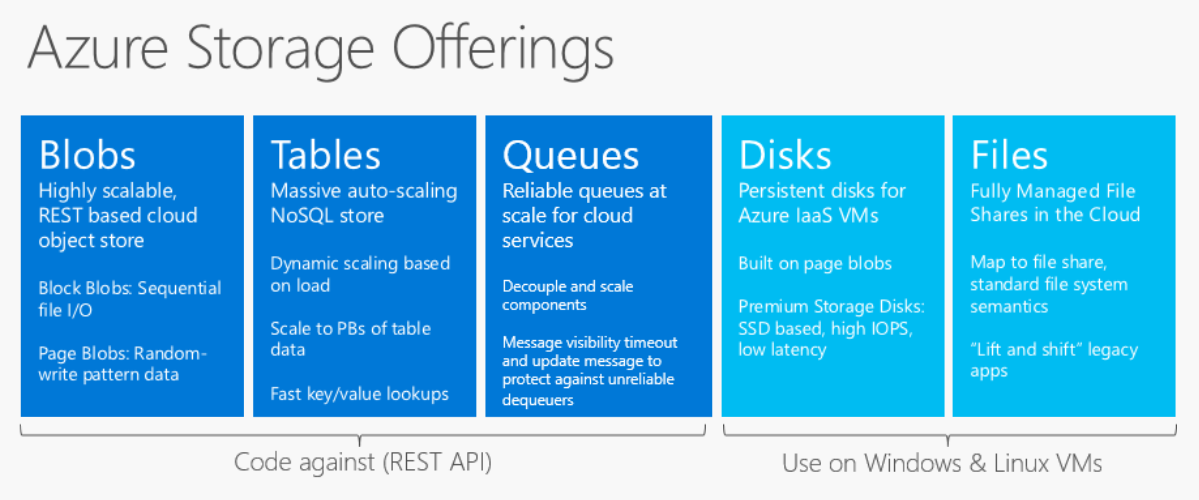
An Azure Storage Account is a secure and scalable storage service, it supports various types of storages, including blobs (for unstructured data), files (for file shares), queues (for messaging between application components), and tables (for NoSQL data).
Storage Types
Blob
Blob storage is a service for storing vast amounts of unstructured data, like text or binary data. It offers scalable, secure, and highly available storage for documents, images, videos, and various other file types. Blobs can be further categorized into different types, such as:
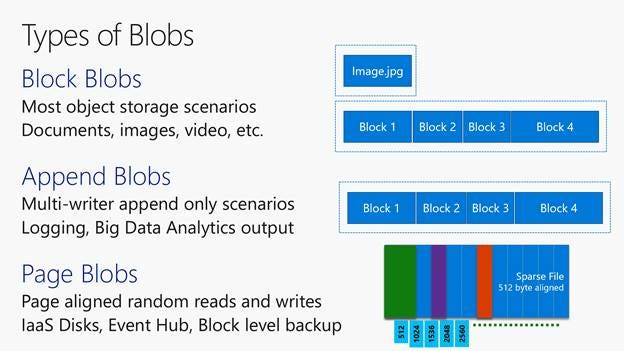
- Block Blobs: Optimized for storing large amounts of unstructured text or binary data, such as documents and media files. They are composed of blocks, which can be managed individually.
- Page Blobs: Designed for random read/write operations, suitable for storing virtual hard drive (VHD) files and serving as the underlying storage for Azure virtual machines.
- Append Blobs: Ideal for scenarios where data needs to be appended, such as logging. Append Blobs are optimized for append operations and cannot be modified once written, except by appending new data.
Each blob type serves specific purposes based on how they store and manage data. Additionally, Azure Blob Storage supports features like blob snapshots, blob leases, and various tiers of storage to help manage costs and performance.
There are 3 types of access tiers:
- Hot tier: Regularly or frequently accessed data; the cost of the hot tier is expensive but offers high performance.
- Cool tier: Rarely accessed data; the cost of the cool tier is not expensive but offers lower performance.
- Archive: Very rarely accessed data.
File Storage
File Storage offers a scalable and fully managed file-sharing service in the cloud, facilitating storage for sharing files, including documents, images, and media, among applications and users. This versatile service caters to various use cases such as file sharing, content distribution, and storing application data.
Queues
Azure Queue Storage is a service for storing large numbers of messages that can be accessed from anywhere in the world via authenticated calls using HTTP or HTTPS. It provides a reliable messaging solution for asynchronous communication between application components.
Tables
Tables are suitable for storing large amounts of non-relational data, such as web application logs, sensor data, or metadata for distributed systems. With horizontal scaling and low latency access, Azure Tables offer a cost-effective solution for applications requiring fast and scalable storage.
Data Redundancy
In Azure Storage, data redundancy involves creating copies of data in multiple locations to ensure its safety and availability in case of unexpected events. Azure provides various types of data redundancy options.
Locally Redundant Storage (LRS)
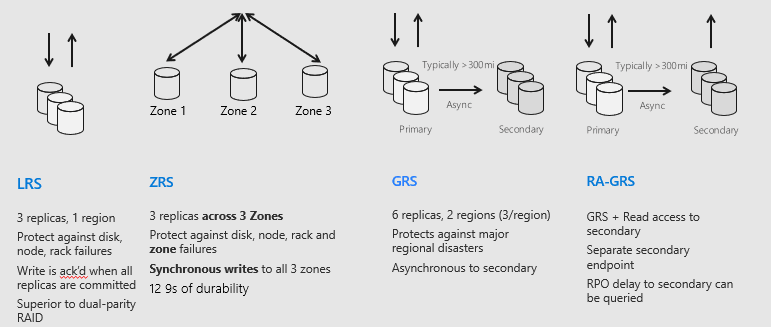
Locally Redundant Storage (LRS) replicates three copies of data within the same datacenter in the primary region to mitigate local hardware failures like rack or drive failures. LRS is the most cost-effective option, providing the lowest level of redundancy.
1 data center = more than 12,000 failures.
Zone-Redundant Storage (ZRS)
Zone-Redundant Storage (ZRS) replicates three copies of data across three availability zones within a single region, enhancing redundancy and durability. Each availability zone is an independent physical infrastructure, offering increased resilience against datacenter-level failures. ZRS protects against disk, node, rack, and zone failures through synchronous writes to all three zones.
1 Zone = 3 data centres.
1 Region = 3 Zones
Geo-Redundant Storage (GRS)
Geo-Redundant Storage (GRS) replicates six copies of data, three in the primary region and three in the secondary region, typically established at least 100 miles away. GRS offers the highest level of redundancy and is ideal for applications requiring robust data durability and disaster recovery capabilities.
Read-Access Geo-Redundant Storage (RA-GRS)
RA-GRS provides the same level of redundancy as GRS but with the added benefit of read access to the data in the secondary region. This allows to read our data from the secondary region, making it useful for scenarios like data access during a primary region outage.
To configure data redundancy in Azure Storage, we can select the appropriate redundancy option when creating a storage account. We can also change the redundancy option for an existing storage account, but the process may require some data movement.
Key Concepts
Access Keys and Shared Access Signatures (SAS)
Access keys are master passwords for Azure Storage; these keys enable complete access to the entire storage account. Access keys are suitable for long-term applications where persistent access is required.
Shared Access Signatures (SAS) are temporary and scoped, granting specific access to defined resources for a limited time. SAS is particularly useful for temporary or specific scenarios, such as granting temporary access to partners or clients, or for applications with dynamic access requirements.
Lifecycle Management
Azure Storage lifecycle management allows the creation of customizable automatic rules for data movement and management across its storage tiers—Hot, Cool, and Archive—which offer varying performance and cost characteristics. These rules facilitate automatic transitions between tiers or data deletion based on specified conditions or retention periods, such as last modified date or data access frequency. This capability helps optimize costs and ensures efficient data management within Azure Storage.
Azure Data Lake
Azure Data Lake Storage (ADLS) is a scalable, secure cloud storage solution designed for big data analytics. It extends Azure Blob Storage with features for hierarchical organization and advanced security.It supports lifecycle management
Key Features:
- Stores Structured, Semi-Structured & Unstructured Data: Supports formats like Parquet, Avro, JSON, CSV.
- Optimized for Big Data & Analytics: Works seamlessly with Azure Databricks, Synapse, ADF, and Spark.
- Hierarchical Namespace (HNS): Enables directory and file-level organization (like a traditional file system).
- Scalable & Cost-Effective: Supports hot, cool, and archive storage tiers for optimized costs.
- Enterprise Security & Access Control: Uses Azure RBAC, ACLs, and encryption for enhanced data security.
- Data Versioning: Maintains multiple versions of data to track changes and enable rollback if needed.
- Geo-Redundant Storage (GRS): Provides disaster recovery by storing copies in different geographical locations.
- Compression Support: Reduces storage costs and improves processing speed by supporting Parquet, ORC, and other compressed formats.
Azure Data Lake Gen1 vs Gen2 vs Blob Storage
Blob Storage (Flat)
Azure Blob Storage is the original, low-cost object store. It provides Hot, Cool, and Archive tiers, full redundancy options (LRS, ZRS, GRS, GZRS, etc.), and block, append, and page blob optimizations. Security is handled at the account or container level through Azure RBAC roles, shared keys, or SAS tokens — there are no file-level ACLs because the service uses a flat namespace. It’s ideal for backups, media, static web assets, and archives but is not a true Hadoop-style data lake out of the box.
Data Lake Storage Gen1
ADLS Gen1 was introduced specifically for big data analytics. It’s a dedicated file system service with a hierarchical namespace plus POSIX-style Access Control Lists (ACLs), allowing granular read/write/execute permissions. However, it lacks support for storage tiers, block/append/page blob types, and only supports regional replication. Microsoft has frozen new Gen1 accounts and announced end of support on 29 Feb 2027, making it a legacy service.
Data Lake Storage Gen2 (Blob + HNS)
ADLS Gen2 merges features of Blob Storage and Gen1. It retains Blob Storage’s cost-effective tiers, lifecycle rules, and redundancy options, while adding hierarchical namespace (HNS) and POSIX ACLs. Azure RBAC manages access at the account/container level, and fine-grained ACLs control file-level permissions. Gen2 enables both object storage and a fully featured, ACL-secured data lake within one service.
Container vs Blob
Container
A container in Azure Blob Storage is a logical grouping and organization of one or more blobs. Containers can be called as directories or folders. Each Azure Storage account can contain an unlimited number of containers, and each container can store an unlimited number of blobs. Container names must be unique within an Azure Storage account.
Blob
A blob is the basic unit of data or actual data entity in Azure Blob Storage. It is a file of any type and size, ranging from a few bytes to terabytes. Blobs are stored inside containers, and each blob has a unique name within its container.